
 HOME
HOME
ID : 10817
Master Setting
Obtaining an EDS File
If you perform master configuration using an EDS file, obtain the EDS file and load it into the network configurator software in the following way.
EDS file is stored in a robot controller. When WINCAPSIII receives "I/O" data from a robot controller, the data is stored in the project folder of WINCAPSIII. The following shows the destination folder path.
- EDS filename and its location
| Folder Path | ...\"Project Name"\Data\Controller\IO\EthernetIP\ |
|---|---|
| File Name | EL6652-0010_RC9.EDS |
Setting of Instance number
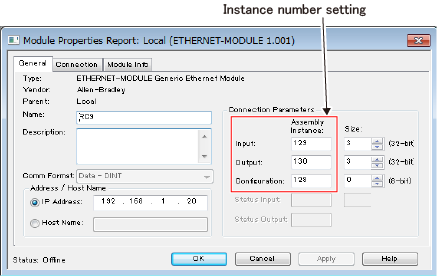
If you perform master configuration without using EDS file of EtherNet/IP slave terminal, you need to set the instance number. Enter the following numbers.
| Instance Name | Instance Number |
|---|---|
| Input | 129 |
| Output | 130 |
| Configuration | 128 |
The following shows an example.
About Input/Output size
Data transmission size by EtherNet/IP slave terminal is 4 bytes larger than the Input/Output size of WINCAPSIII.
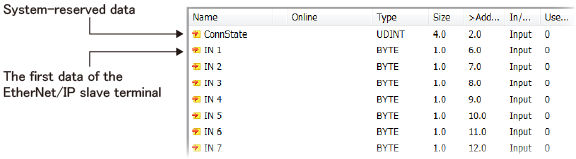
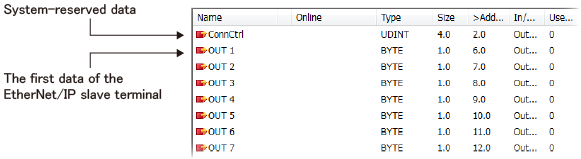
This 4 bytes is system-reserved data for the EtherNet/IP slave terminal, not available for users.
If you configure an EtherNet/IP slave terminal with master configurator, set the data size 4 bytes larger than the Input/Output data size of WINCAPSIII.
The following shows an example.
| WINCAPSIII setting | Configurator setting | |
|---|---|---|
| Input Size | 32 byte | 36 byte |
| Output Size | 32 byte | 36 byte |
System-reserved data is assigned at the start of the input/output data. Viewing from the master, the first data of the EtherNet/IP slave terminal is 4 bytes later from the first data.
The following shows examples.
- Input Data
- Output Data
Run/Idle Header
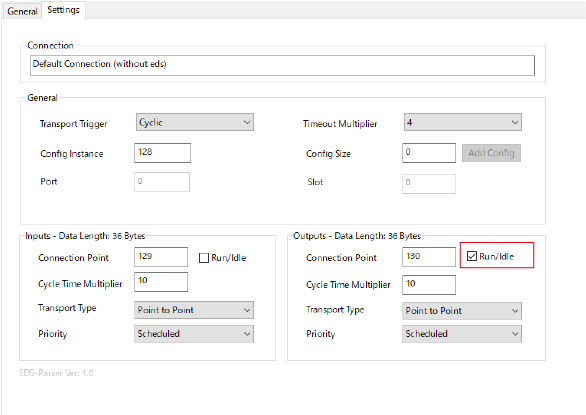
“Run/Idle” is fixed in the following state for the RC9 robot controller side. If necessary, set it on the master side according to the following.
| Input/Output (RC9 side) | Run/Idle |
|---|---|
| Input | Included |
| Output | Not included |
- Setting example (when the master is BECKHOFF IPC)
Select the checkbox of “Run/Idle” of output (input for RC9). Input (output for RC9) is not necessary.
Connection with the Rockwell Automation PLC
When connecting with the Rockwell Automation PLC, the following settings were necessary for the RC8 robot controller.
- Set to use [32-bit run/idle header] on the controller side.
- Set the instance number on the master side.
For the RC9 robot controller, setting No.1 is not necessary because of specification changes.
Setting No.2 is necessary, but the instance number is different from the one of the RC8 robot controller.
Also, as same as other PLC, it is necessary to set so that the input/output size of the master side is 4 bytes larger.
ID : 10817