
 HOME
HOME
ID : 10815
Setting
Installation of EtherNet/IP Slave Terminal
For how to install the EtherNet/IP slave terminal, refer to “Connecting method” in “I/O Options”.
Function Expansion of a Robot Controller
To use the EtherNet/IP slave terminal, expand a robot function by registering a license key to the robot controller beforehand.
To expand the function, register a license key on the controller through the smart TP or WINCAPSⅢ. For details, refer to “Registering License”.
If a robot controller is purchased together with a license, the robot controller is shipped with the function expansion being completed.
Setting of Communication Parameters
Set the communication parameters according to components and environment.
| Setting items | Description |
|---|---|
| Robot Controller Setting |
Set a device with WINCAPSIII. Select a device and set the input/output size and IP address. |
| Master Setting |
If you set the master using an EDS file, obtain the EDS file and load it into the configurator. If you do not use the EDS file, you need to set the instance number. |
Checking of Setting
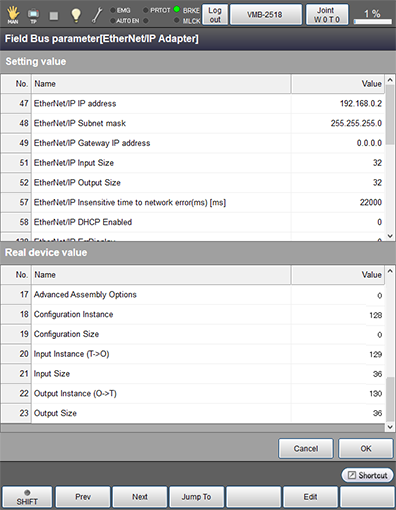
With the following smart TP operation, you can check the device information of the EtherNet/IP slave terminal and information that is set with the controller.
Operation path: [F4 I/O] - [F6 Aux] - [F4 Field Bus parameter]
ID : 10815
- Related Information
- Robot Controller Setting
- Master Setting