
 HOME
HOME
ID : 10874
LED Display
The Front Panel of DeviceNet Slave Terminal
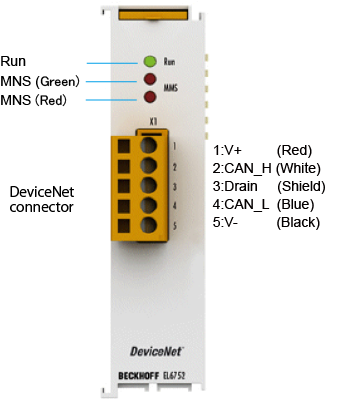
When the controller power (including the network power) is on, do not disconnect/connect the communication connector or touch its pins. Doing so will result in a failure.
It is recommended that either of the following crimp terminals be used for the communications cable.
| No. | Crimp terminal | Tools required |
|---|---|---|
| (1) | AI series (Phoenix Contact) | ZA3 (Phoenix Contact) |
| (2) | TC series (Nichifu) For thin cables: TC 0.3-9.5 For thick cables: TC 2-11 (for power supply) TC 1.25-11 (for communication) |
NH-69 |
| Note | 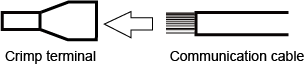 |
|
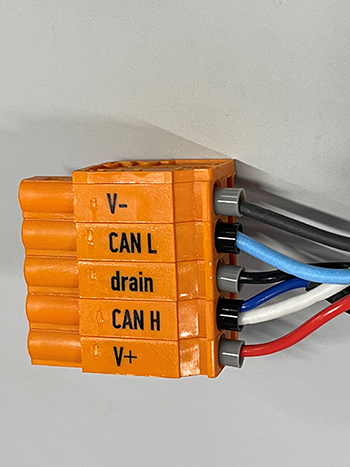 |
Detailed Explanation of Status
The following shows detailed explanation of status.
For further details of contents, refer to the individual instruction manual of the DeviceNet slave terminal linked to ”I/O options available to set by WINCAPSIII”. It is written in “7.1 EL6752 - LED description”.
LEDs for EtherCAT Diagnosis
| LED | Colours | Meaning | |
|---|---|---|---|
| RUN | green | This LED indicates the terminal's operating state | |
| off | State of the EtherCAT State Machine: INIT = initialization of the terminal; BOOTSTRAP = function for terminal firmware updates |
||
| flashing | State of the EtherCAT State Machine: PREOP = function for mailbox communication and different standard-settings set |
||
| Single flash | State of the EtherCAT State Machine: SAFEOP = verification of the sync manager channels and the distributed clocks. Outputs remain in safe state |
||
| on | State of the EtherCAT State Machine: OP = normal operating state; mailbox and process data communication is possible |
||
| MNS green | green | off | Master is offline |
| flashing | Master is offline flashing Master is online and is performing the Duplicate MAC-ID check |
||
| on | Master is online and is communicating with the configured slaves | ||
| MNS red | red | flashing | Communication error of the master with one of the configured slaves |
| on | DeviceNet Bus OFF, DeviceNet voltage error, Master failed Duplicate MAC-ID check | ||
ID : 10874