
 HOME
HOME
ID : 10884
LED Display
The Front Panel of PROFIBUS Slave Terminal
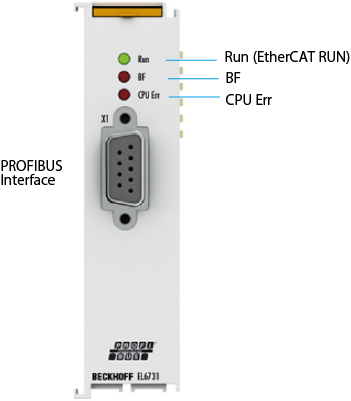
PROFIBUS Interface
The PROFIBUS interface has 9-pin D-Sub, female connector and the communication method is RS-485.
Detailed Explanation of Status
The following shows detailed explanation of status.
For further details of contents, refer to the individual instruction manual of the PROFIBUS slave terminal linked to ”I/O options available to set by WINCAPSIII”. It is written in “5.1.8.1 LED description”.
| LED | Color | Meaning | |
|---|---|---|---|
| RUN | green | This LED indicates the terminal's operating state: | |
| off | State of the EtherCAT State Machine: INIT = initialization of the terminal; BOOTSTRAP = function for firmware updates of the terminal |
||
| single flash | State of the EtherCAT State Machine: PREOP = function for mailbox communication and different standard-settings set |
||
| Flashing | State of the EtherCAT State Machine: SAFEOP = verification of the sync manager channels and the distributed clocks. Outputs remain in safe state |
||
| on | State of the EtherCAT State Machine: OP = normal operating state; mailbox and process data communication is possible |
||
| BF | red | off | DP master is in CLEAR/OPERATE mode, all DP slaves are in data exchange |
| Flashing | DP master is in CLEAR/OPERATE mode, at least one DP slave is in data exchange | ||
| on | DP master is in STOP mode | ||
| CPU Err | ed | on | EL6731 processor error |
| single flash | The EL6731 processor starts | ||
ID : 10884