
 HOME
HOME
ID : 10938
LED Display
The Front Panel of EtherCAT Bridge Terminal
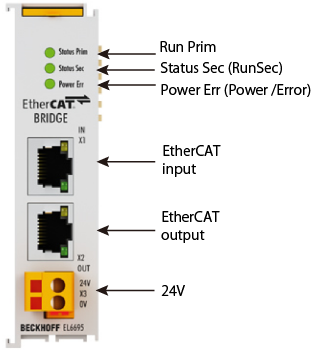
Detailed Explanation of Status
The following shows detailed explanation of status.
For further details of contents, refer to the individual instruction manual of the EtherCAT bridge terminal linked to ”I/O options available to set by WINCAPSIII”. It is written in “7.5 Diagnostics”.
| LED | Meaning | |
|---|---|---|
| Run Prim Run Sec (operating state of the respective slave side) |
off | State of the EtherCAT state machine: INIT = initialization of the
terminal or BOOTSTRAP = function for firmware updates of the terminal |
| Run Prim Run Sec (operating state of the respective slave side) Power/Error (supply state) |
green flashing | State of the EtherCAT state machine: PREOP = function for mailbox communication and different standard-settings set |
| green single flash | State of the EtherCAT state machine: SAFEOP = verification of
the sync manager channels and the distributed clocks. Outputs remain in safe state |
|
| green on | State of the EtherCAT state machine: OP = normal operating state; mailbox and process data communication is possible | |
| off | No supply | |
| Power/Error (supply state) |
orange | Supply only from one side, primary or secondary |
| flashing red | FW update failed, send terminal to service | |
| green | Supply present on both sides, 24 V input is used |
ID : 10938