
 HOME
HOME
ID : 11089
Optimal speed control function
In MC9 series, Mode1 and Mode 3 of the Optimal speed control function will be available by configuring the Dynamics setting by specifying the following robot type in the kinematics configuration.
| Name | Robot type name | |
|---|---|---|
| H | 4 Axis Scalar Robot | |
| 6-Axis Type A | 6 Axis Type A robot | |
| 6-Axis Type B | 6 Axis Type B robot | |
For information about how to set each function, refer to Optimal speed control function.
If the dynamics setting is not performed correctly, an error may occur and PTP motion may not be possible.
In that case, revise the dynamics setting, or set the Optimal speed control function to "0" and retry the motion.
Dynamics setting
1
Dynamics setting is performed with WINCAPSIII.
With WINCAPSIII, open a project to perform Dynamics setting, and disiplay the axis setting table.
Operation path :[Project tab] - [Axis setting table] - [Axis setting table tab]
2
Scroll the axis setting table tab down to the bottom, set the parameters in [Dynamics setting].
For values to be set in each parameter, see the table below.
| Parameter name | Description of setting |
|---|---|
| Link mass [kg] | Enter the mass characteristics of each link. To decide a parameter value, refer to the linked page. |
| Center of gravity position X[m] | |
| Center of gravity position Y[m] | |
| Center of gravity position Z[m] | |
| Moment of inertia around the Moment of inertia X [kgm^2] | |
| Moment of inertia around the Center of gravity Y [kgm^2] | |
| Moment of inertia around the Center of gravity Z [kgm^2] | |
| Mechanical Coulomb's friction [Nm] | Enter the friction on the output side and the coefficient of viscosity of each link. |
| Coefficient of viscosity [Nms] | |
| Inertia on the motor side [kgm^2] | Enter the inertial viewed from the rotor of motor. |
| Motor rated torque [Nm] | Enter the value listed in the catalog of motor you use. |
| Motor rated current instruction [A] | |
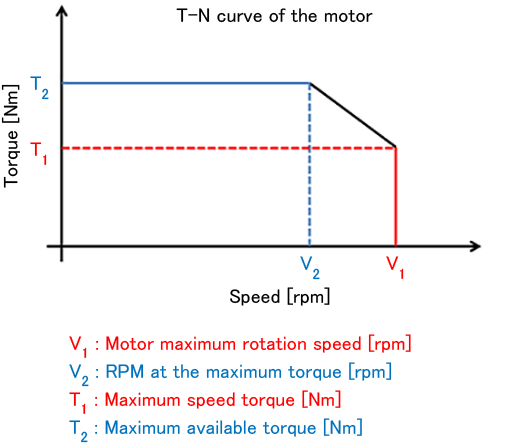
| Maximum speed torque [Nm] | From the TN characteristics listed in the catalog of motor to use enter the torque value at the with maximum rpm. To decide a parameter value, refer to the linked page. |
| RPM at the maximum torque [rpm] | From the TN characteristics listed in the catalog of motor to use enter the the maximum rpm to output the maximum torque. To decide a parameter value, refer to the linked page. |
| Motor maximum rotation speed [rpm] | From the TN characteristics listed in the catalog of motor to use , enter the maximum rpm. To decide a parameter value, refer to the linked page. |
| Maximum available torque [Nm] | From the TN characteristics listed in the catalog of motor to use enter the maximum torque. To decide a parameter value, refer to the linked page. |
Reference
-
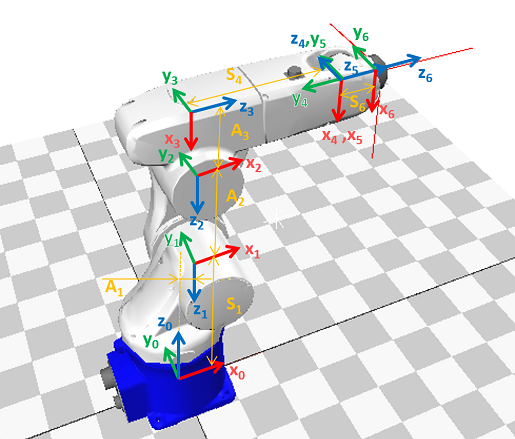
Example of the reference coordinate of 6-axis robot
-
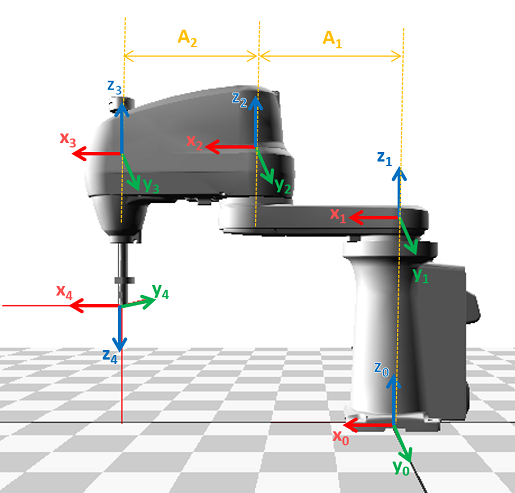
Example of the reference coordinate of 4-axis robot
-
Relationship between the T-N curve of motor and each parameter.
ID : 11089