
 HOME
HOME
ID : 11234
CC-Link Communication Connector and LEDs
Front Panel of the CC-Link Slave Terminal
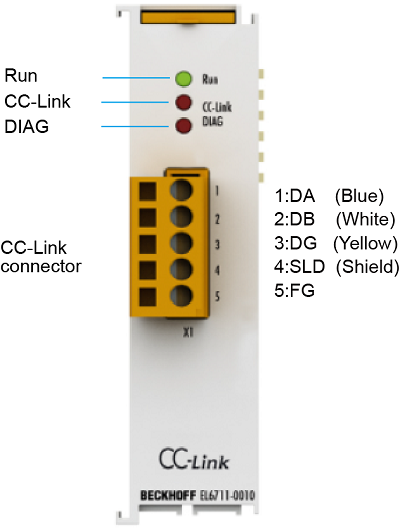
When the power supply for the robot controller (including the network) is ON, do not connect/disconnect the communication connector or touch its terminals. Otherwise, a malfunction may occur.
Either of the following products should be used as crimp terminals for the communication cable.
| No. | Crimp terminal | Dedicated tool |
|---|---|---|
| 1 |
AI Series |
ZA3 |
| 2 |
TC Series (manufactured by NICHIFU CO., LTD.) |
NH-69 |
| Note |
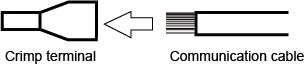 |
|
Details of the LEDs
The following shows detailed descriptions of the LEDs.
For further details, refer to the individual instruction manual for the CC-Link slave terminal linked to the page titled ”I/O Options Available to Set by WINCAPSIII”. See "4.6 LEDs" in the page.
| LED | Color | Meaning | |
|---|---|---|---|
| RUN | Green | This LED indicates the terminal's operating state: | |
| off |
State of the EtherCAT State Machine: INIT = initialization of the terminal |
||
| flashing uniformly |
State of the EtherCAT State Machine: PREOP = function for mailbox communication and different default settings set |
||
| flashing slowly |
State of the EtherCAT State Machine: SAFEOP = verification of the Sync Manager channels |
||
| on |
State of the EtherCAT State Machine: OP = normal operating state; mailbox and process data communication is possible |
||
| flashing rapidly |
State of the EtherCAT State Machine: BOOTSTRAP = function for terminal firmware updates |
||
| CC-Link (Run) | Green | off |
|
| on | normal reception of refresh and polling signal or only the refresh signal, after participation in the network | ||
| CC-Link (ERR) | Red | off |
|
| on |
|
||
| flashing | The settings were changed after the last restart / reset | ||
| DIAG (CC-Link SD) | Green | off |
|
| on | during transmission | ||
| DIAG (CC-Link RD) | Blue | off |
|
| on | Recognition of the carrier | ||
ID : 11234