
 HOME
HOME
Outline
Brief Description of the Conveyor Tracking
Conveyor tracking is a robot function that allows robots to keep track of work pieces carried by the conveyor without stopping the conveyor.
There are two types of conveyor tracking.
- Sensor tracking
- The sensor tracking system is applied to pick up workpieces which are placed linearly (but with arbitrary interval) on the moving conveyor.
In this system, a signal is generated when a work piece traverses in front of a photoelectric sensor.
Once this signal is generated, position data of the work piece is registered in the controller. Based on that, the controller calculates the expected work piece position on the conveyor and instructs the robot to follow the work piece. This process is performed whenever a work piece passes in front of the photoelectric sensor.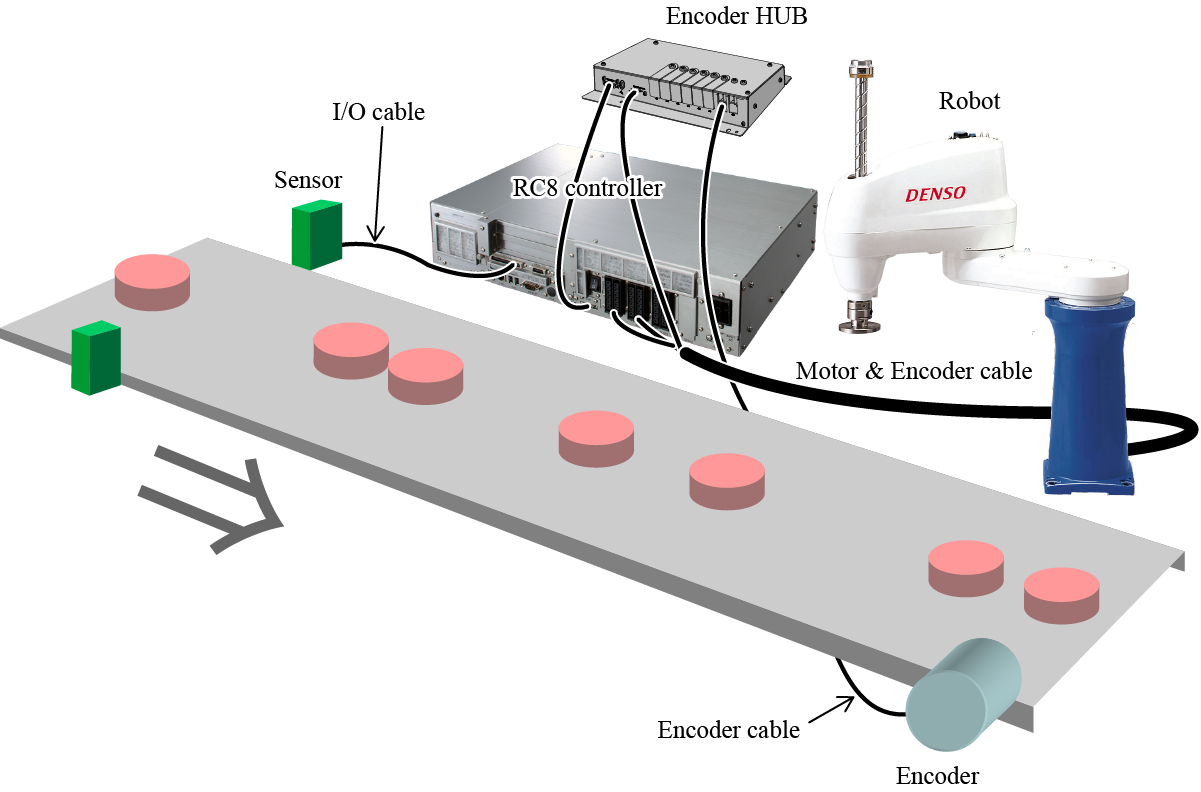
- Vision tracking
- The vision tracking system is applied to pick up workpieces which are placed on arbitrary position and attitude on the moving conveyor.
In this system, a signal is generated when an image recognition unit of the vision sensor detects a work piece.
Once this signal is generated, position and the angle of the work piece are registered in the controller. Based on that, the controller calculates the expected work piece position and instructs the robot to follow the work piece. This process is performed whenever the signal is generated.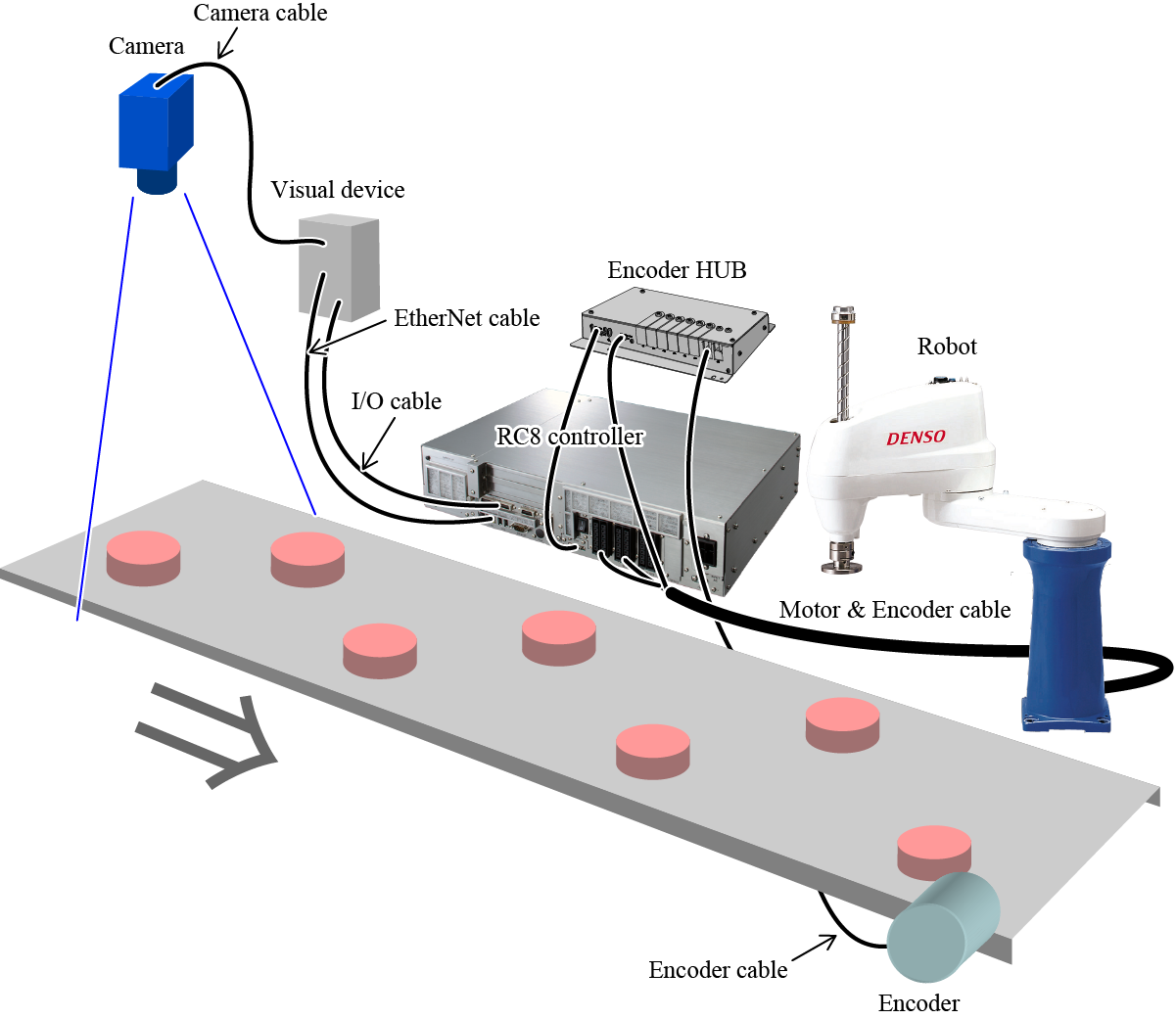
This function can be used with neither the cooperative control function, the force control function, nor exclusive control.
Enabling Conveyor Tracking Function
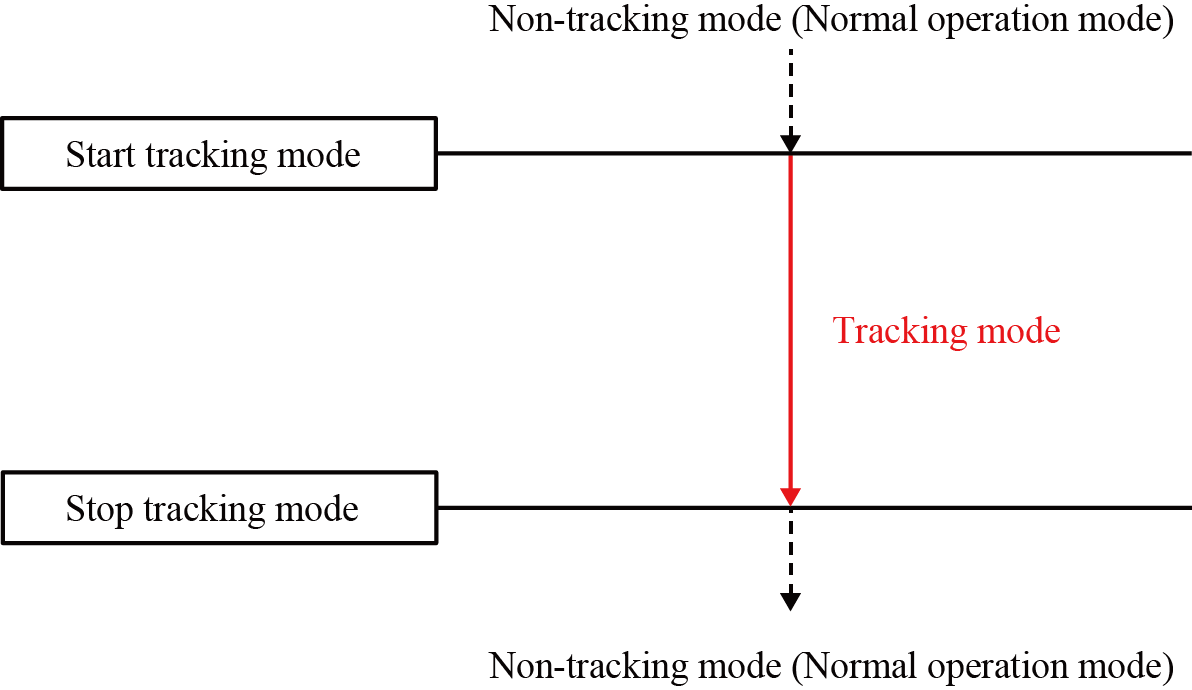
The operation status of the conveyor tracking are defined by the following terms.
- Tracking mode
- "Tracking mode" means a state that the conveyor tracking is enabled.
Calling conveyor tracking-dedicated commands (TrackApproach, TrackDepart, and TrackMove) while the conveyor tracking is enabled will allow robots to follow the target position according to the conveyor's motion. - Non-tracking mode (Normal operation mode)
- "Non-tracking mode" means a state that the conveyor tracking is disabled. This is the default setting at the controller startup.
To move a robot arm to a static target position, use motion commands (such as Approach, Depart, and Move) in this mode.
To change the tracking mode, use dedicated commands for tracking mode change (TrackStart and TrackStop).
Robot Motion during Tracking Mode
While tracking mode is enabled, robot motion is controlled by the tracking mode-dedicated commands, such as TrackApproach, TrackDepart, and TrackMove.
Please note that if a tracking mode-dedicated command is used during tracking mode even once, robot starts automatically moving in parallel with the conveyor in order to track with the conveyor motion.
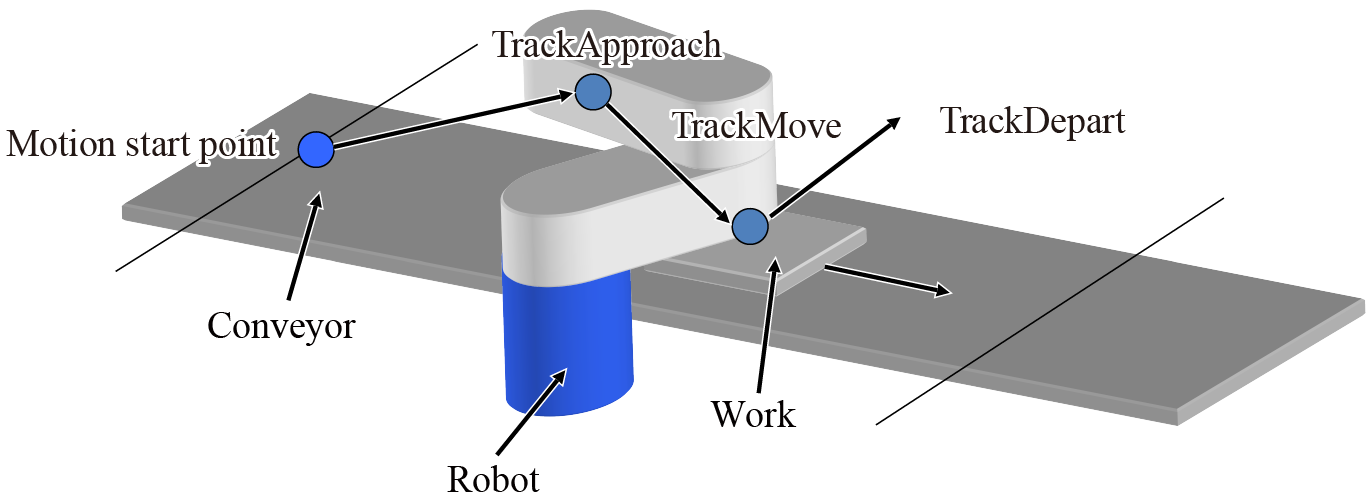
The robot motion status during the tracking mode are defined by the following terms.
- Conveyor catch-up motion (Catch-up motion)
- Conveyor catch-up motion indicates a robot motion that catches up to the target workpiece on the conveyor.
The robot accelerates its speed until it catches up to the workpiece, and then moves in parallel to the conveyor once the robot reaches the work piece. - Robot task motion
- Robot task motion is a robot motion that performs actual robot tasks along with the conveyor catch-up motion.
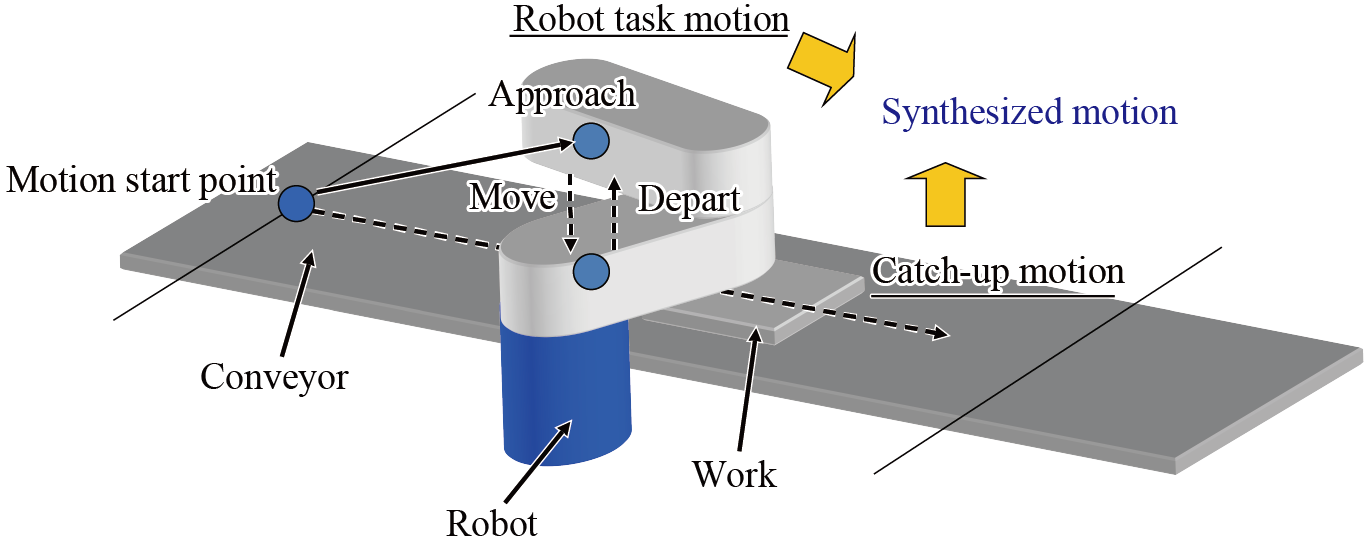
Robot motion during the tracking mode is the synthesized motion of the conveyor catch-up motion and the robot task motion.
For example, a TrackApproach motion is a synthesized motion of the conveyor catch-up motion and Approach motion. In this context, Approach motion corresponds to the robot task motion.
Range of the Conveyor Catch-up motion
If a tracking mode-dedicated command (TrackApproach, TrackDepart, TrackMove) is used during tracking mode even once, robot starts automatically moving in parallel with the conveyor in order to keep tracking with the conveyor motion.
In RC8, to define the area of conveyor tracking according to the operation, following terms are defined.
- Tracking range
- This is an area on the conveyor where the robot can perform the conveyor catch-up motion.
Tracking range is delimited by the upstream limit and the downstream limit. The upstream limit is set to the direction where a workpiece comes from, whereas the downstream limit is set to the direction where a workpiece goes to. To use multiple robots, set a tracking range for respective robots.
- Upstream limit of the tracking range (Upstream limit)
- Once a work piece passes this limit, a robot starts the conveyor catch-up motion.
This must be set within the motion range of the robot arm.
- Downstream limit of the tracking range (Downstream limit)
- Once a work piece reaches this limit, robot stops the conveyor catch-up motion and starts deceleration.
This must be set within the motion range of the robot arm.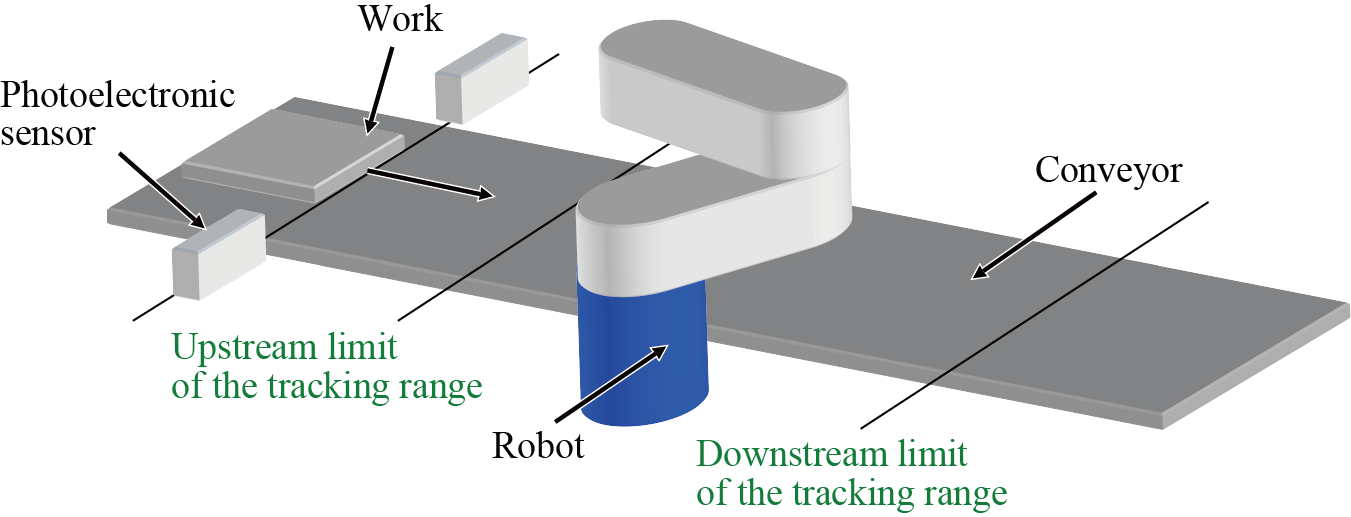
Conveyor Tracking with Multiple Robots
By using RC8s, multiple robots can perform conveyor tracking on one conveyor.
This operation is practical when multiple robots perform each task in different area on the conveyor, provided that the conveyor tracking area is divided into two parts; upstream and downstream.
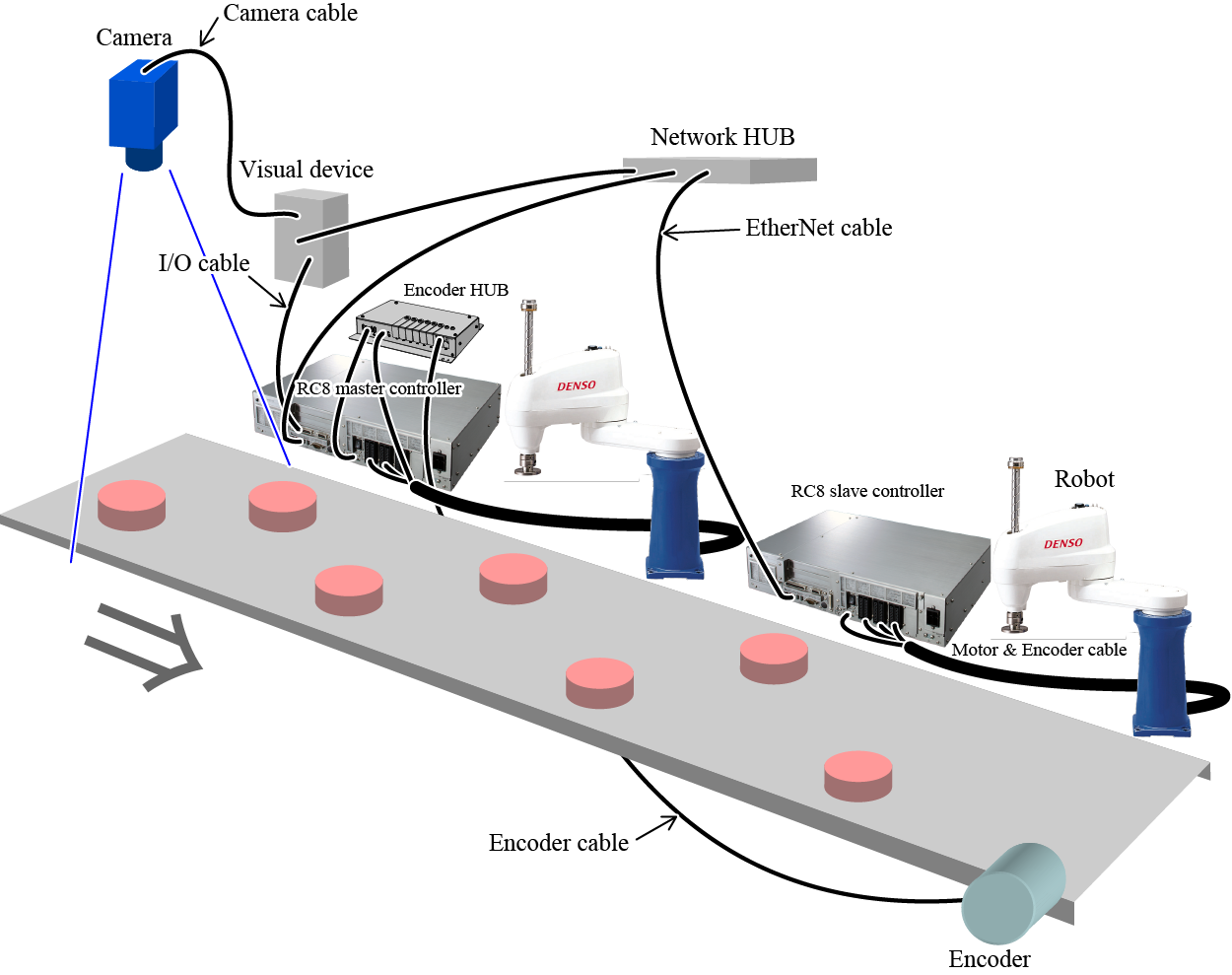
When conveyor tracking is performed by multiple robots, each robot controller is assigned to one of the following.
- Master Controller
- Master controller receives a signal that is generated when a sensor or vision sensor detects a work piece in order to obtain the position information of the work piece.
Among multiple controllers, only one controller is assigned to the master controller. This controller performs conveyor tracking itself and also is entitled to instruct other controllers which work piece to track. - Slave Controller
- All controllers except master controller will be the slave controller.
A slave controller receives tracking target work piece data via Ethernet communication, and then performs conveyor tracking.