
 HOME
HOME
ID : 3107
Cable Connection Using an Internal Wiring
If your robot is VS-series having a communication interface flange-A, you can use the internal wiring as a wiring between a robot controller and a force sensor.
System Configuration
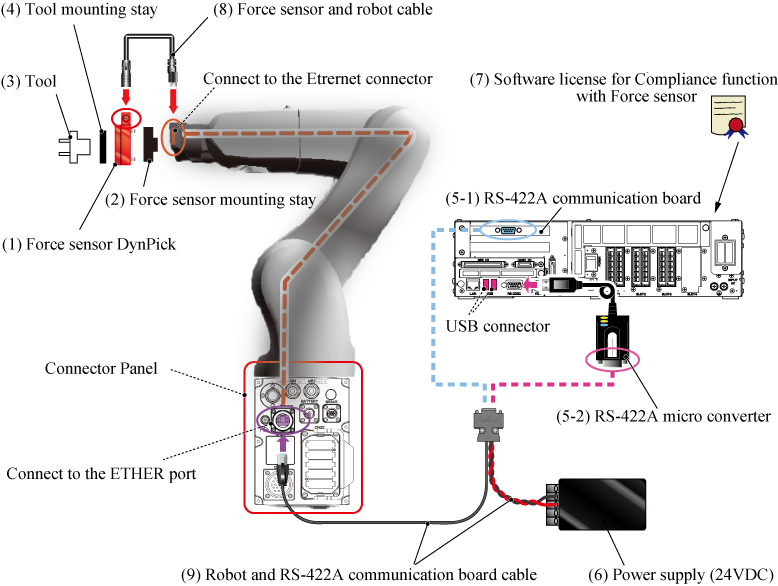
The figure above shows a VS-050 robot set having a rear connector panel.
The position of connectors in a connector panel differs depending on the robot model. Please refer to "Connectors" of VS SERIES USER'S MANUAL.
| Components | Description | ||||
|---|---|---|---|---|---|
(1) Force sensorWACOH-TECH Inc.
|
This is a capacitive force sensor, Dyn-Pick. Select a force sensor according to your application. |
||||
(2) Force sensor mounting stay(made by customer) |
A stay for fixing a force sensor to the end of the robot arm. For details, refer to "How to Install a Force Sensor". |
||||
(3) Tool(selected by customer) |
Select a tool according to your application. | ||||
(4) Tool mounting stay(made by customer) |
A stay for fixing a tool to the force sensor. When you create a stay, please refer to the Installation Diagram on "Overview of Force Sensor" of Preparation of Hardware. |
||||
|
The following two devices are available for the Force sensor and robot controller connection.
|
|||||
(6) Power supply (24VDC)(selected by customer) |
A power supply to supply electricity to the force sensor. Connect two lines (red and black lines) of a force sensor and RS-422A communication board cable.
For detailed information, please refer to the user's manual of DynPick Capacitive 6-axis force sensor WEF-6A series. For about user's manual of force sensor, please contact to WACOH-TECH Inc.. Be careful not to connect a red line (+24V) and a black line (0V) incorrectly as this may result in damage to the force sensor. |
||||
(7) Software license for Compliance function with Force sensorDENSO WAVE Inc.
|
This is a DENSO product. A license to enable the Compliance function with Force sensor. There are two options: "Compliance function-activated" and "License only". "Compliance function-activated" targets a newly purchased robot set. Ordering this option with a robot set will activate the Compliance function with force sensor before shipment. Please order this option with a robot set. "License only" targets a robot set that has been shipped without "Compliance function-activated" option. To use this function with such robot set, please order "License only". If you order "License only", you need to activate the Compliance function with force sensor on your robot controller. For about how to activate the function, please refer to "Activation of the Compliance Function with Force Sensor". |
||||
(8) Force sensor and robot cableWACOH-TECH Inc.
|
A cable to connect a force sensor and a robot. | ||||
(9) Robot and RS-422A communication board cableWACOH-TECH Inc.
|
A cable to connect an RS-422A communication device (RS422-A communication board or RS-422A micro converter) and 24VDC regulated power supply to a robot. Select any cable length according to your application. |
||||
*1 : Until around July 2018, CWE-6AE180-SA (cable length 180mm) was sold.
ID : 3107