
 HOME
HOME
ID : 9645
Payload Estimation Function
Payload estimation function is a function to estimate the mass of payload and the center of gravity by making robot perform specific movement. This function can be used when setting "Mass of payload" and "Payload center of gravity".
The result of measuring values could be different from the the actual values. If you get accurate values with CAD or Calculation etc., use that values without using this function instead.
Outline of Motion When Measuring
Robot operates through the motion path in 1 to 3 ways according to measuring objects.
Ensure that there is no interference between the robot and equipment in the lower speed motion because the motions at lower and higher speed are performed at each operation path.
When in the lower speed motion, the robot performs at the 10% of speed and acceleration in its higher speed motion.
The speed of the robot may be more than 250 mm/s at the flange (mechanical interface) or the TCP point during the motions when measuring.
Maximum Travel Distance
Robot moves automatically when measuring.
After moving to the + direction, the robot returns to the start position.
Mass of Payload
| Motion axis | Motion 1 | |
|---|---|---|
| Start point of motion | Travel distance | |
| J3 | 90° | 1° |
| J5 | 0° | 1° |
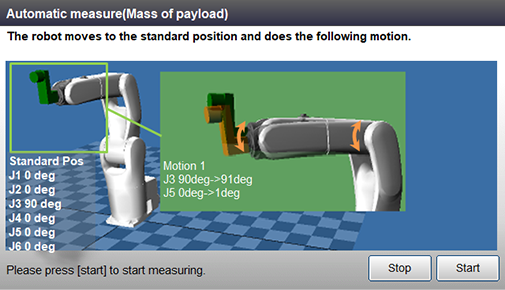
Payload Center of Gravity
| Motion axis | Motion 1 | Motion 2 | Motion 3 | |||
|---|---|---|---|---|---|---|
| Start point of motion | Travel distance | Start point of motion | Travel distance | Start point of motion | Travel distance | |
| J5 | 0° | - | 0° | - | 0° | 1° |
| J6 | 90° | 1° | 0° | 1° | 0° | - |

Operation Procedures
For each operation procedure of measurement, refer to the following sections.
- When you perform auto measuring, do the Mass of Payload first, and then Payload center of gravity. If you execute in different order, the measurement result could be incorrect.
- If the calculation values of the Mass of Payload and Payload center of gravity have been identified, enter these values. In this case, you do not need to perform the Auto measuring.
ID : 9645
- Related Information
- Auto Measuring Mass of Payload
- Auto Measuring Payload Center of Gravity