
 HOME
HOME
ID : 9655
Program Check
What Is Program Check?
Program check is a function available in Auto mode to allow operators to run a program rapidly and review it from outside of the safety fence. From the Smart TP, operators can run the robot automatically and conduct a final check to make sure a teaching-completed program runs as intended.
Manual operation and variable move with the Smart TP and program edit are available just as in Manual mode while the program check remains selected.
Setting Procedures
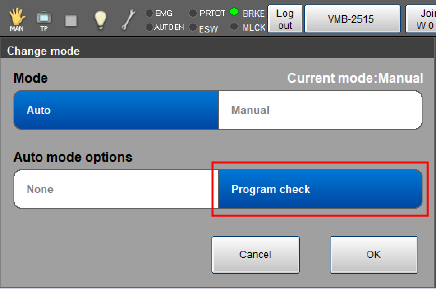
When you change the operation mode, select [Program check] in [Auto mode options].
Restrictions
- Selecting the program check will automatically set the motion speed to 10%. After selecting the program check, you can change the motion speed up to the same as in the normal Auto mode.
- During the manual operation or variable move, the maximum speed of the robot is limited to 250 mm/s or less at the flange (mechanical interface) or the tool center point (TCP).
- The robot can operate only when both the enabling switch and the [FWD] key are being pressed down.
- In the program check, you cannot run several programs simultaneously. Therefore, any motion command to run several programs simultaneously will be ignored.
ID : 9655