
 HOME
HOME
ID : 9666
Emergency Stop
Pressing the emergency stop button halts currently running all programs and the robot stops because the motor power is turned off.
Operation Procedures
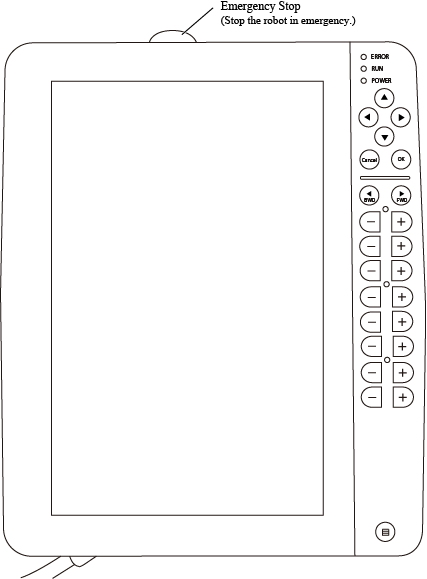
Press [Emergency stop] button on the smart TP.
Restarting the robot after an emergency stop executes the selected program from the first line.
To restart the robot, first turn the motor power on, then execute any of [Step Start], [Cycle Start], or [Continuous Start].
- Motor will be turned off at the emergency stop; however, robot may unexpectedly move by inertia.
- Make sure that there is no danger such as collision or accident in advance when restarting robot after emergency stop.If the robot is restarted as it is after emergency stop, it will execute the selected program from beginning.
Difference of Stop Process in the Controller's Version
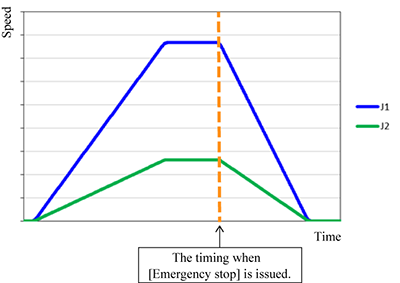
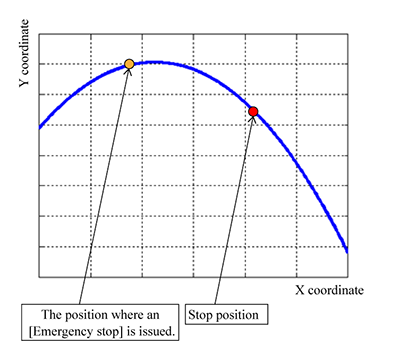
All axes synchronize the motion and stop at the same time. The robot stops on the planned path.
- Speed
- Path
ID : 9666