
 HOME
HOME
ID : 9742
Displaying and Changing I/O Parameters
Operation path: [F4 I/O] - [F6 Aux] - [F5 I/O parameters]
Display and change the setting values of I/O parameters.
Tap [F5 I/O parameters] to display the following [I/O Parameters] window.
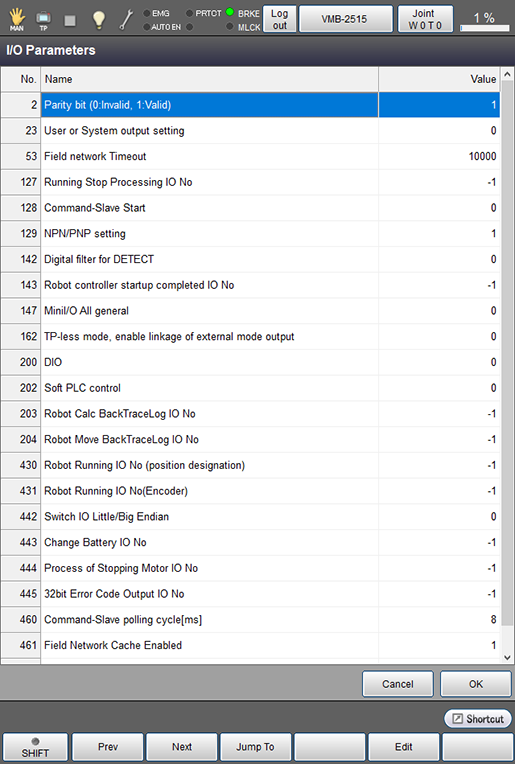
| No. | Name | Description |
|---|---|---|
| 2 | [Parity bit] | Specify parity valid/invalid state for I/O command range. |
| 23 | [User or System output setting] | To use the continue start enable signal, input "1". |
| 53 | [Field network Timeout] | Set the field network timeout. |
| 127 | [Running Stop Processing IO No] |
When the entire program has stopped such as an emergency stop or instantaneously stop and others, the program cannot reboot in a certain period of time. |
| 128 | [Command-Slave Start] |
To activate the Command-Slave function, add Command-Slave license and set the value to "2". |
| 129 | NPN/PNP setting | Changes the NPN and PNP setting. |
| 142 | [Digital filter for DETECT] | When DETECT function is enabled, the high speed digital filter to detect I/O at high-speed works automatically. If this parameter is set to [1: Standard], the filter detects I/O at normal speed. When using this function in normal condition, select [0: High speed]. |
| 143 | [Robot controller startup completed IO No] |
Specify an I/O number which turns ON at the time of the controller start-up. |
| 147 | [MiniI/O All general] |
This option is used when you would like to use all I/O ports of the Mini I/O as the user I/O, in the Mini I/O dedicated mode. |
| 162 | TP-less mode, enable linkage of external mode output | If the controller is pendant-less state, this signal turns ON/OFF according to the switching ON/OFF of the Enable Auto. |
| 200 | DIO | Enables/Disables the DIO setting. |
| 202 | Soft PLC control | Changes the software PLC setting. |
| 203 | BackTraceLog IO No | Specify an I/O number to output whether path of the origin return has been calculated or not. |
| 204 | Robot Move BackTraceLog IO No | Specify an I/O number to output whether the origin return has been executed or not. |
| 430 | [Robot Running IO No (position designation)] |
Specify an I/O number which turns ON while a command to move the robot is issued from the controller. |
| 431 | [Robot Running IO No (Encoder)] |
Specify an I/O number which turns ON when the encoder value indicates "robot running state" (when the robot is actually running). |
| 442 | [Switch IO Little/Big Endian] | Switch big-endian and little-endian of data declared by DefIO. |
| 443 | [Change Battery IO No] | Specify a user output number that turns ON if the encoder battery maintenance date has passed. Available I/O numbers are the number of user outputs. If output is not necessary, input "-1". The encoder battery maintenance date is checked with Smart TP. From the top screen, tap [F6 Setting] - [F7 Date and Maintenance]-[F3 Encoder Battery]. |
| 444 | [Motor OFF indicator IO No] | Specify a user output number that turns ON while the motor status is changing from ON to OFF. During the motor OFF processing (when this signal is ON), the motor cannot be turned ON. (Example: Switching from the manual mode to the auto mode) Available I/O numbers are the number of user outputs. If output is not necessary, input "-1". |
| 445 | [32bit Error Code Output IO No] | Specify a user output number that outputs error code of 32-bits. Starting from the specified output port number, the following 31-ports are used for user outputs. If output is not necessary, input "-1". |
| 460 | [Command-Slave polling cycle [ms]] | The smaller this value is, the more frequently the I/O area for the Command-Slave will be checked. |
| 461 | [Field Network Cache Enabled] | Enable/Disable the field network cache. Set "0" if you do not use this signal. |
| 462 | [Field Network Cache Available Time [ms]] | Set the cache valid time while the field network cache is enabled. |
| Available function keys | |
|---|---|
| [F1 Prev] | Display the previous page of the currently displayed I/O parameter list. |
| [F2 Next] | Display the next page of the currently displayed I/O parameter list. |
| [F3 Jump To] | Numeric keypad will be displayed. Enter parameter number with the key pad, and tap [OK] to display the target parameter. |
| [F5 Edit] |
Select a configuration to be changed, then tap [Edit] to display the numeric keypad or the entry window. This key is available only when the currently logged-in account is granted user permission for "Programming" or "Maintenance". |
ID : 9742