
 HOME
HOME
ID : 10786
Replacing the Encoder Backup Battery
The position data of the encoder built in the servomotor is stored in the internal memory of the encoder.
The backup battery for each memory retains the above data while the power to the robot controller is turned off. However, these batteries have a limited lifetime and must, therefore, be replaced regularly.
| Battery type | Used to: | Located: |
|---|---|---|
| Encoder backup battery | Retains back up the position data of the servomotor encoder. | Encoder backup battery box on the 1st arm of the robot |
Without replacing the backup batteries, important robot-specific data stored in memory will be lost.
Replacement Procedure
1
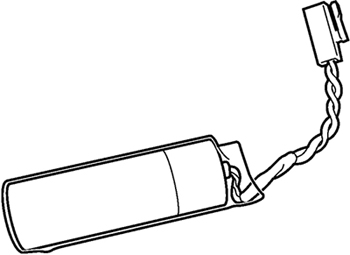
Prepare a new set of 2 backup batteries for replacement.
| Parts name | Part number |
|---|---|
| Encoder backup battery, 2 pieces | 410679-001* |
2
Turn the controller power off.
3
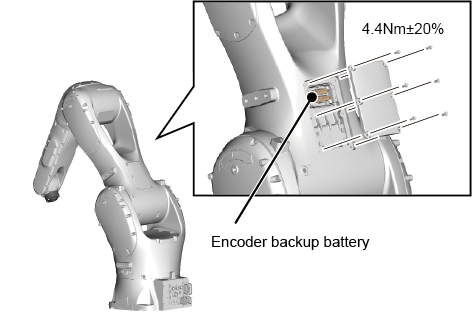
Remove the cover from the Encoder Backup Battery Box.
The protected type (IP67) and clean type robots have a gasket (rubber sealing) on the back of the cover. The gasket is vital in maintaining their sealing capabilities. Handle the gasket carefully enough so as not to damage or bend and deform it. If the gasket is damaged, replace it with a new one.
For how to purchase the gasket, contact our sales representatives.
| Part name | Part No. |
|---|---|
| Gasket for 1st arm, rear cover × 1 piece | 416350-005* |
4
Replace the backup batteries using the procedure below.
First join the connector of a new battery to an empty connector on the robot unit, disconnect and remove the old battery, then load the new one.
During replacement, at least one battery should be connected. Disconnecting all batteries loses position data.
Be sure to replace all batteries with new ones at one time. Using old and new batteries together shortens the service life.
5
Install the cover of the encoder backup battery box in the right position so that the sponge on the back of the cover touches the batteries.
This completes the procedure for replacing the backup batteries.
How to Set the Next Replacement Date
After replacing the batteries, set the next replacement date using the Smart TP or the mini-pendant.
For how to set the date, refer to "Displaying and Changing Encoder Battery Maintenance Schedule Screen" of Smart TP Operation Guide or "Setting the next Battery Replacement Date" of Mini Pendant Operation Guide.
ID : 10786