
 HOME
HOME
ID : 10946
Setting the Auto Logout Time
Operation path: [F6 Setting] - [F11 Risk Management]
Set the auto logout time.
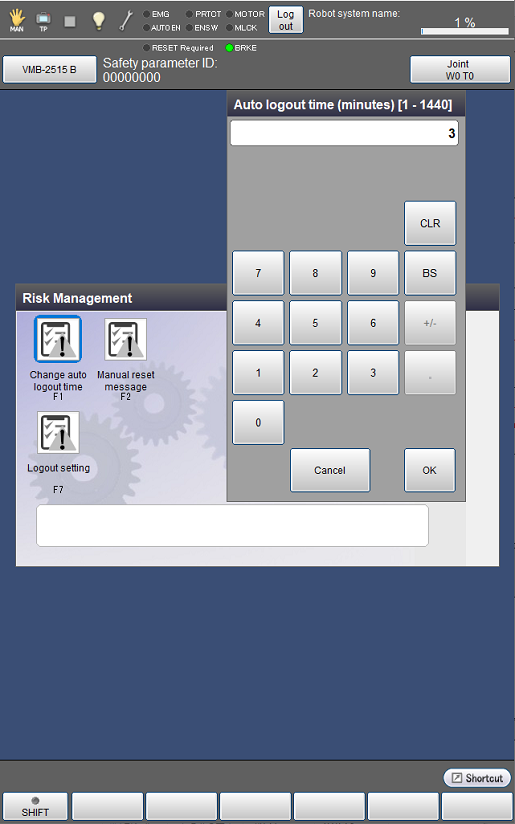
Logout time can be changed between 1 and 1440 minutes.
You can set different logout times for [Operation, Programming (restricted)] and [Programming, Maintenance, Risk Management] respectively.
This operation is available only when the currently logged-in account is granted user permission for "Risk Management".
Setting Method
1
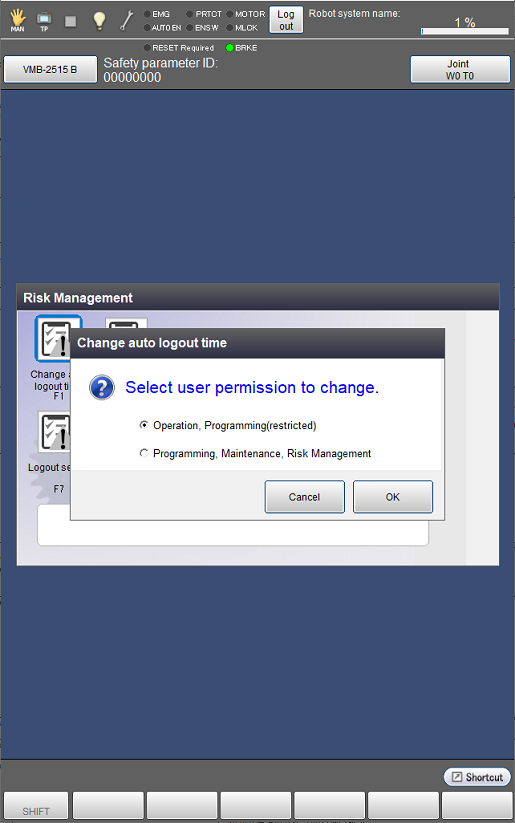
In the [Change auto logout time] window, select user permission for which you want to change the logout time.
2
Enter a logout time to set in minutes using the numeric keypad.
Logout time can be set in unit of a minute.
A risk assessor must consider the automatic log-out time taking the following risks into consideration.
If you are logged in to an account granted user permission for Programming, Maintenance, or Risk Management, the following risks can be expected.
- A person who are not logged in moves the robot by operating the pendant
- A person who are not logged in rewrites a program using the pendant
- A person who are not logged in rewrites variables or other data
ID : 10946