
 HOME
HOME
ID : 10963
Boundless Rotation of Auxiliary Axes
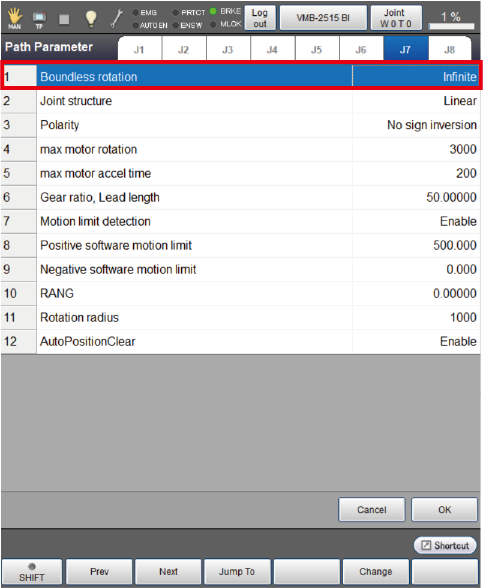
The boundless rotation function suppresses errors that could occur if an auxiliary axis keeps on rotating in the same direction. You need to set the [Boundless rotation] parameter to [Infinite] on the [Path Parameter] setting window.
Notes for Setting Boundless Rotation on Auxiliary Axes
- If a movement of a rotary axis exceeding the range of ± 360° is commanded, the axis rotates the specified angle and then it automatically returns to the position within the range of ±360°. This correction operation changes the reference position (CALSET position). Therefore, the Step Back function cannot return the program control back to the steps preceding the change of the reference position.
-
In a boundless rotation motion command, the effective number of digits is 7. If a value exceeding 7 digits is specified, the actual rotation amount will differ from the specified one.
Example
If Drive (5, 11111115555) is specified,
11111115555 will be internally interpreted as 1.111111*E+10 so that 5555 will be trimmed due to the definition of a single precision floating point number. - If a large value is specified as the amount of movement at one time in boundless rotation, then the "Out of range" error will occur. The quantum of movement depends on the gear ratio.
-
When an auxiliary axis is used as a rotary axis requiring positioning, e.g., index table, observe the following instructions.
- For the reduction gear ratio, enter an integer multiple. Entering a non-integer multiple will result in a positioning error after a lot of rotations.
-
If a relative motion command specifies a motion amount using a decimal, the auxiliary axis could reach the position slightly different from the specified one. Using such a relative motion command repeatedly will result in a positioning error after a lot of rotation.
To avoid such a positioning error, correct the difference from the specified position.
-
When the motor turns more than ±32768 rotations from the reference position (CALSET position), if the RC9 robot controller is turned off, the CALSET operation may be required at the next controller startup.
To avoid this, execute PosClr before turning off the RC9 robot controller.
How to Set Boundless Rotation
Operation Path: Top Screen - [F2 Arm] - [F12 Maintenance] - [F10 Joint Settings] - [F4 Path Parameter]
In the [Path Parameter] window, set the [Boundless rotation] parameter to [Infinite]. For details on how to set the boundless rotation, refer to “Path Parameter Setting.
ID : 10963