
 HOME
HOME
ID : 11050
How to pull out cables
1
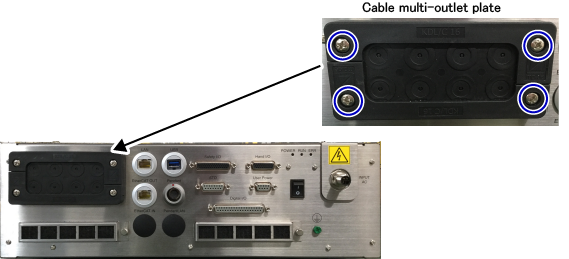
Remove screws on the four corners of the cable multi-outlet plates with a cross-head screwdriver.
Remove the plate from the MC9 series controller.
2
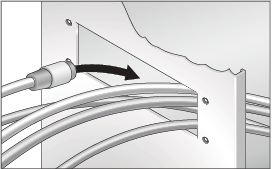
Pass all cables you want to pull out through the rectangle hole where the cable multi-outlet plate was placed.
3
From the cable multi-outlet plate, at first, use only the hole plate.
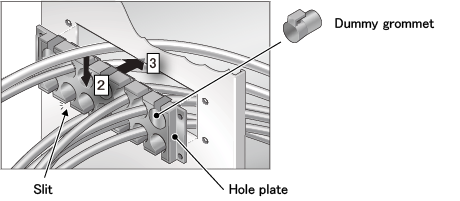
- In the factory default, all of openings on the hole plate are covered with dummy grommets. Remove the grommet from the hole where you want to pass the cable.
- Pass the cable through the slit of the hole plate.
- After you pass all cables through the holes of the hole plate, place the hole plate to the rectangle hole of the MC9 series controller.
4
Catch a cable with a suitable grommet, pass the grommet through the hole of the hole plate.
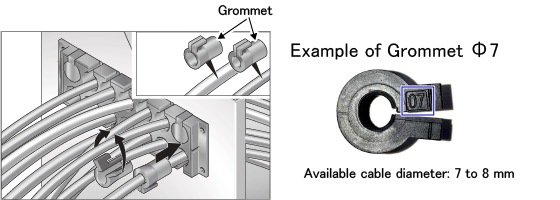
You can check the applicable cable diameter for your grommet by the number on the grommet. For example, if your grommet is "Grommet ⌀7", the number "07" is written as the above figure. In this case, the applicable cable diameter is between 7 to 8mm. The following table shows the correspondence between the number on the grommet and applicable cable diameter.
| No. | Applicable cable diameter | Part name |
|---|---|---|
| 04 | 4 to 5 mm | Grommet Small size * one hole ⌀4 - 5 |
| 05 | 5 to 6 mm | Grommet Small size * one hole ⌀5 - 6 |
| 06 | 6 to 7 mm | Grommet Small size * one hole ⌀6 - 7 |
| 07 | 7 to 8 mm | Grommet Small size * one hole ⌀7 - 8 |
| 08 | 8 to 9 mm | Grommet Small size * one hole ⌀8 - 9 |
| 11 | 11 to 12 mm | Grommet Small size * one hole ⌀11 - 12 |
| 16 | 16 to 17 mm | Grommet Medium size* one hole ⌀16 - 17 |
| 4×2 | 2 mm | Grommet Small size * four holes × ⌀2 |
| 2×2 | 2 mm | Grommet Small size * two holes × ⌀2 |
* Small size and medium size are defined by the grommet manufacturer Murrplastik Systems, Inc.
If the cable diameter of your cable is applied to two grommet types, it is recommended to use the smaller one.
For example, if a cable diameter is 7mm, number"06" and "07" grommets are available. In this case, use "06" grommet.
For cables of grommet, the following shows an example of the cable sold by DENSO and cables that customers need to prepare
- Cable sold by DENSO
- Cable that customers need to prepare
| Cable | Grommet number |
|---|---|
| Multi-Bus Cable | 16 |
| Cable | Grommet number |
|---|---|
| USB cable for IPC connection | 04 |
| Ethernet cable | 05 |
| 06 | |
| In User Power wiring, when inputting I/O power from external power by loose wires | 4×2 |
| 2×2 |
5
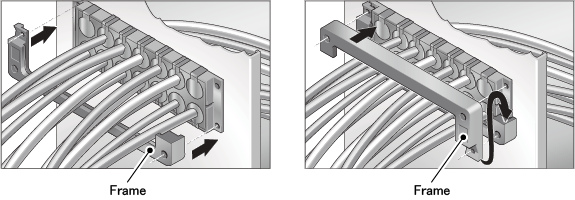
After you put grommets for all cables, install two frames for the cable multi-outlet plate.
6
Tighten up the screw on the four corner of the cable multi-outlet plate with the following tightening torque.
- tightening torque : 2.5 to 3.5 Nm
If cables require high tensile strength (e.g.; using heavy cables), use a cable tie to support. Basically, there is no problem without a cable tie.

7
Connect cables to connectors of inside of the MC9 series controller.
This completes the operation.
ID : 11050