
 HOME
HOME
ID : 11077
Specify Robot Joints
MC9 series can operate up to eight servo motors.
The motors (axes) that are connected to the controller can be registered as either robot joints or auxiliary axes.
Any of the 1st-4th axes can be registered as robot joints.
Registering axes as robot joints will enable you to execute robot motion commands for CP motion (linear and circular).
To enable those robot motion commands, the 1st-4th axes need to be configured based on the predetermined structures.
All axes except robot joints are used as auxiliary axes.
For how to operate robot axes and auxiliary axes, refer to "Auxiliary Axis Guide".
Robot Joints
According to the number of robot joint used, configuring the 1st-4th axes based on the Cartesian coordinate system shown below will enable you to drive those joints with robot motion commands for CP motion (linear and circular).
| Configuration with a single axis | 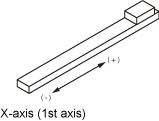 |
|---|---|
| Configuration with two axis | 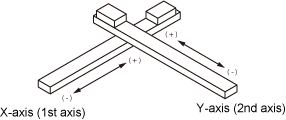 |
| Configuration with three axis | 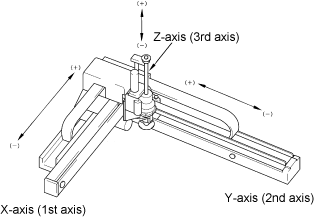 |
| Configuration with four axis | 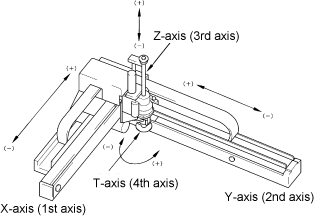 |
To drive robot joints correctly in CP motion (linear or circular), the joint configuration and the motion directions must match the Cartesian coordinate system (coordinates for RIGHTY) shown above.
In a different joint configuration, executing a CP motion command causes an unexpected motion. It is dangerous. Use PTP motion instead of CP motion.
Auxiliary Axis Operation
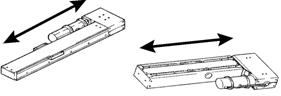
An auxiliary axis operates based on the single-axis configuration as shown below, which can perform only PTP motion. "Move Command" cannot be executed to an axis registered as an auxiliary axis. Use "DriveA" and "Drive Command" to drive an auxiliary axis.
ID : 11077
- Related Information
- How to Specify Robot Joints