
 HOME
HOME
ID : 11133
Base Setting by using Easy Teaching
Operation path: Top screen - [F2 Arm] - [F6 Aux] - [F10 Base] - [F4 Easy Edit]
This screen appears only when the currently logged-in account is granted user permission for "Programming".
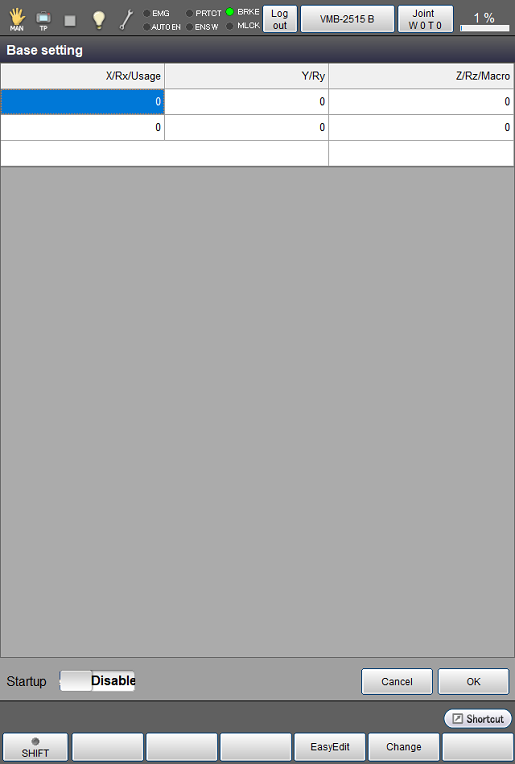
| Available function keys | |
|---|---|
| [F1 Prev] | Display the previous page of the currently displayed P-type variable. |
| [F2 Next] | Display the next page of the currently displayed P-type variable. |
| [F3 Jump To] | Display numeric keypad. Enter the item number of P-type variable to display, and press [OK] to display the P-type variable item for the specified number. |
| [F5 Edit] | Display numeric keypad. With the numeric keypad, enter P-type variable number to register, and then press [OK] on the numeric keypad to register the coordinates of the registered P-type variable. |
| [F6 Get Position] | Load a current position into a position coordinate (P-type variable). Choose desired number and position coordinate (P-type variable) and then press [OK] to load the current position. |
About Three-point Teaching
Before performing the base definition, perform the teaching for arbitrary three points (an origin point, a point in the X-axis direction, and a point on the X-Y plane) as reference points and then register them to the position coordinates (P-type variables). Perform the base definition based on these data.
For each point, refer to the following table.
| Point on X axis | Specify a given point on the X-axis where X is greater than zero. |
|---|---|
| Point X-Y plane | Specify a given point on the X-Y plane where Y is greater than zero (the first quadrant and the second quadrant). Specifying a point where Y is smaller than zero may set the direction(s) of Y-axis and/or Z-axis to unexpected direction(s). If Y = 0 is specified, calculation result will not output because the calculation is impossible. |
When you use Easy Edit window for the three points teaching, it shall be performed on Work0 (base coordinate).
ID : 11133