
 HOME
HOME
ID : 9722
Recover CALSET Data
Operation path : [F2 Arm] - [F12 Maintenance] - [F7 CALSET]] - [F2 Recover CALSET data
This CALSET is done when encoder system down occurs.
Bring the joint, where the system failure occurred, to the near mechanical end, and execute [Recover CALSET data] to recover encoder information similar to the original condition.
Press [F2 Recover CALSET data] to display the following [Recover CALSET data] window.
CALSET position can be set in the [Recover CALSET data] window.
The initial values for the CALSET position at the power-on are equal to the RANG values.
If the CALSET data recovery is done after the power-on, the CALSET position that has been set at the CALSET data recovery operation will be displayed.
To individually select ON/OFF for each joint, directly touch ON/OFF characters of each joint to set.
Pressing [OK] on the window will execute CALSET by using the CALSET position displayed on the right side of the window.
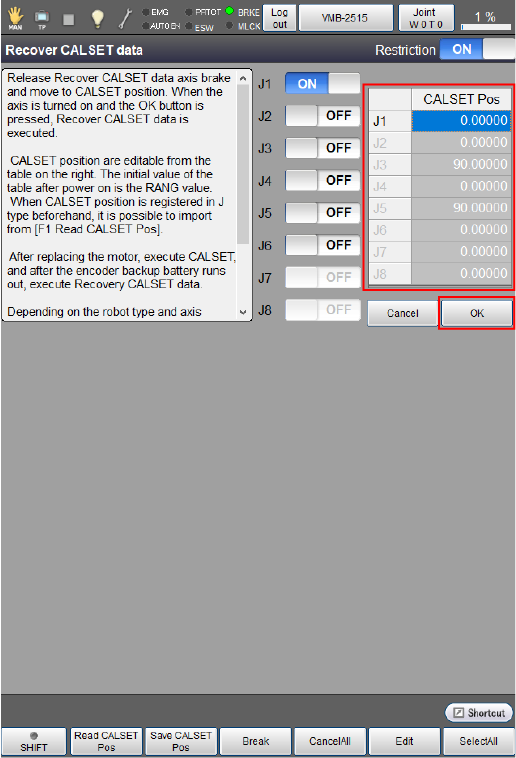
Also, by pressing [F1 Read CALSET Pos], CALSET position or RANG values that have been saved in J-type variables can be read as the CALSET position.
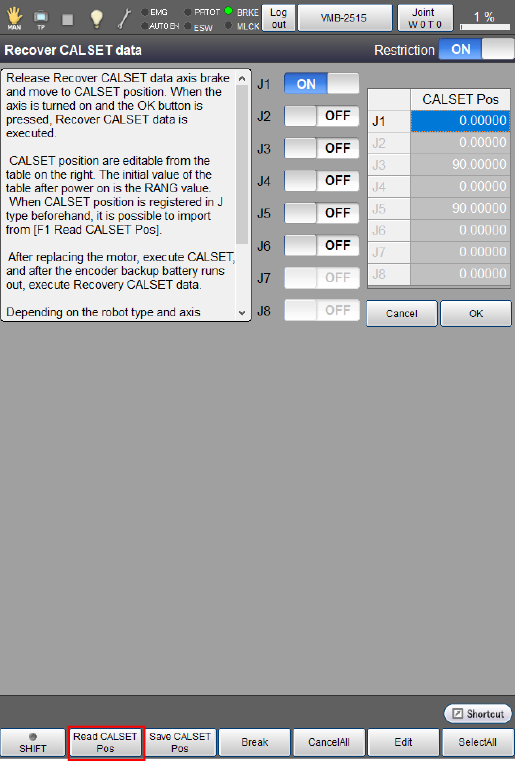
Pressing [F1 Read CALSET Pos] will display the following window.
Select the target item to read, and then press [OK] to acquire the CALSET position.
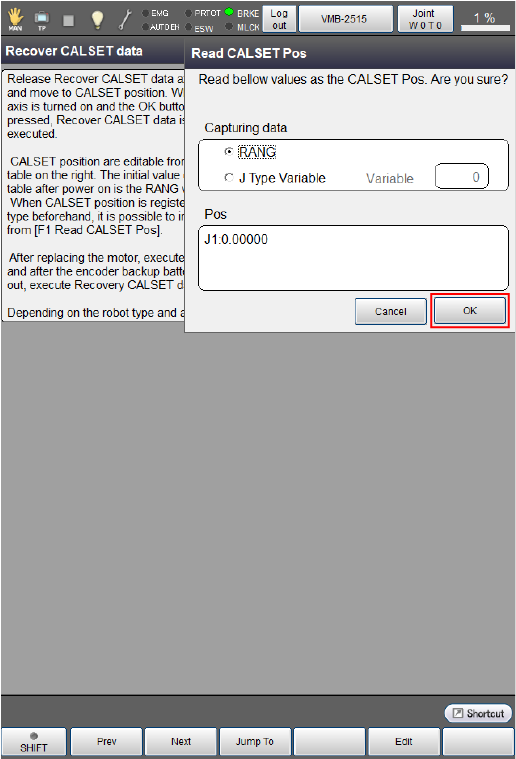
Also, the CALSET position that has been edited directly from the Recover CALSET data window can be saved in J-type variables by pressing [F2 Save CALSET Pos].
| Available function keys | |
|---|---|
| [F1 Read CALSET Pos] | Read J-type variables or RANG values as a CALSET position. |
| [F2 Save CALSET Pos] | Save the CALSET position which is currently displayed in J-type variables. |
| [F3 Break] | Display the brake setting. |
| [F4 Cancel All] | Change all joints to "No CALSET (OFF)". |
| [F5 Edit] | Display the value editor. |
| [F6 Select All] |
Change all joints to "CALSET (ON)". Change it ON, and press [OK] to restore CALSET data. |
| Keys other than function keys | |
|---|---|
| Restriction | If "OFF" is selected, any axis where CALSET is not required can be selected as well. |
ID : 9722